

AI has changed the way I approach UX design by helping me move from ideas to prototypes much faster. Rather than replacing UX methods, AI helps automate repetitive tasks, generate starting points, and accelerate exploration throughout the design process.
Creating Personas
Personas are an important tool for understanding users, but finding appropriate imagery can often become a surprisingly time-consuming task. Rather than searching through stock photo libraries, AI can quickly generate persona images based on demographic and behavioral descriptions.
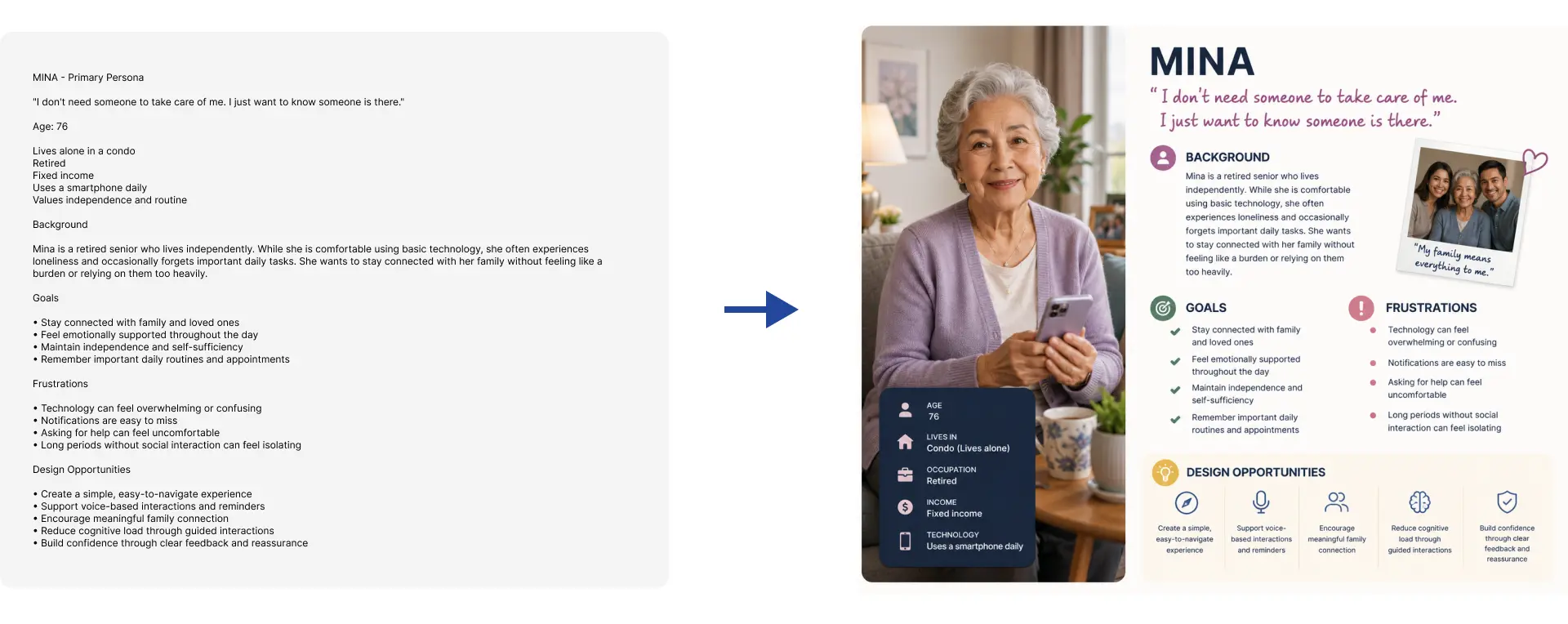
This allows me to create more representative and relatable personas while spending less time on supporting visuals. Instead, I can focus on refining user goals, motivations, pain points, and behaviors—the elements that ultimately make personas valuable to the design process.
While the image itself doesn't improve the quality of the persona, it helps stakeholders connect with the user more easily and creates a more engaging presentation of research findings.
Supporting Ideation
AI is particularly useful during brainstorming and ideation sessions. It can generate alternative approaches, suggest features, identify edge cases, and help explore solutions that may not have been considered initially.
Rather than relying on a single idea, I can quickly generate multiple directions and evaluate them before moving forward with design.
One important lesson I've learned is that AI is often eager to provide complete solutions, features, and recommendations, even when important details are still missing. While this can accelerate ideation, it can also introduce assumptions that haven't been validated. Instead of accepting every suggestion, I review the output, extract useful insights, and focus on the ideas that are relevant to the current stage of the project.
Used this way, AI becomes a valuable brainstorming partner that helps expand possibilities without replacing critical thinking and design judgment.
Transforming Sketches into Wireframes
One of the most useful applications of AI is converting rough sketches into clean low-fidelity wireframes. Instead of recreating everything manually, I can upload hand-drawn concepts and use AI to generate organized wireframes that serve as a starting point for further refinement.

This significantly reduces the time required to move from early ideas into structured layouts.
Accelerating Prototyping
After creating wireframes, tools such as Figma Make can transform those designs into working prototypes. AI-generated prototypes provide a faster way to test interactions, user flows, and interface concepts.
My development background adds another advantage to this workflow. Because I understand front-end development and React, I can review and modify generated code when necessary, allowing me to refine prototypes beyond what AI initially produces.
This creates a much faster path from concept to interactive experience.
Faster Iteration and Design Exploration
AI makes it possible to generate multiple design variations in a fraction of the time required through traditional methods. By combining wireframes, brand assets, color palettes, and design requirements, I can quickly explore different directions and gather feedback earlier in the process.
This rapid iteration cycle helps reduce uncertainty and allows better ideas to emerge before significant development effort is invested.
Final Thoughts
The greatest value of AI in UX design is its ability to accelerate exploration and iteration. It helps remove many of the repetitive tasks that slow down the design process while giving designers more opportunities to evaluate ideas and improve solutions.
AI doesn't replace UX thinking, user research, or design expertise. Instead, it allows designers to spend more time solving problems and less time on manual production work.